Box Review: Secure Content Management, AI Workflows, Pricing, and Education Team Fit
A shared folder sounds simple until a school department, research team, vendor, and legal reviewer all need different access to the same files. Someone needs version history. Someone needs external sharing. Someone needs signatures. Someone needs to prove that sensitive content is protected. That is the real buying question behind a Box review: you are not just paying for storage, you are deciding whether Box should become the governed content layer for a team.
The short version: Box is strongest when content needs security, workflow, and external collaboration around it. It is weaker when the job is only personal file backup or casual document editing. If your organization already pays for Google Workspace or Microsoft 365, Box has to earn its place through governance, partner collaboration, compliance, AI-assisted document work, and admin control.
This review is based on Box official pricing, product, education, AI, support, and security pages checked on May 9, 2026, plus third-party review signals from G2, Capterra, TrustRadius, and TechRadar. We did not run a fresh enterprise deployment or speed benchmark in this session. Our review standards are described in our editorial policy, and you can learn more about this site on our About page.
Box Review: What Box Actually Does
Box describes its platform as Intelligent Content Management. In practical terms, that means file storage, secure sharing, external collaboration, e-signature, workflow automation, Box AI, governance, security controls, and integrations around the same content repository. The official Box AI page frames the product around extracting value from unstructured content such as contracts, research files, proposals, reports, and internal documents.
The product makes the most sense when files are not static. A syllabus, research consent form, grant proposal, accreditation document, vendor contract, or training video often moves through multiple people. Box is designed for that kind of movement: upload, share, comment, sign, preserve, classify, and audit.
| Box capability | What it means in practice | Strong fit |
|---|---|---|
| Secure file sharing | Share folders and links with permission controls | Departments working with vendors, students, partners, or reviewers |
| Version history | Keep prior versions available by plan level | Teams editing controlled documents |
| Box Sign | Request and track e-signatures inside the content workflow | Forms, approvals, waivers, vendor agreements |
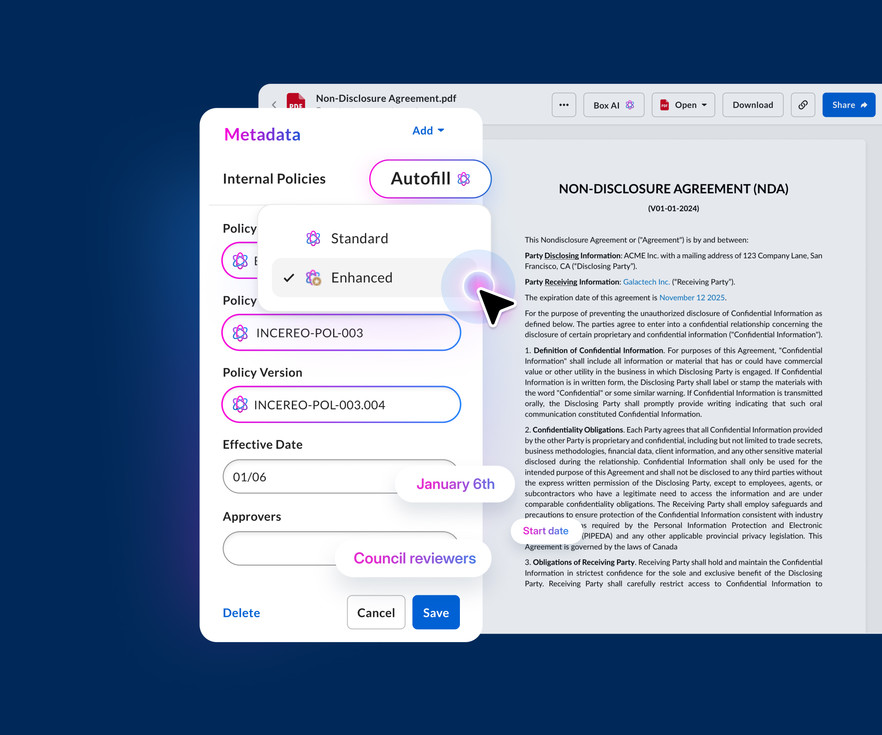
| Box AI | Ask questions, summarize, draft, and extract metadata from content | Teams that review long documents repeatedly |
| Governance and compliance | Retention, classification, security policies, audit visibility | IT, legal, research, finance, and regulated teams |
| Integrations | Connect with Microsoft 365, Google Workspace, Slack, Salesforce, and more | Organizations that do not want another isolated repository |
That breadth is also the main caution. Box can be too much product if the team only needs a simple drive.
Pricing and Plan Fit
The official Box pricing page listed a free Individual plan with 10 GB storage and 250 MB file uploads. Personal Pro was listed at $10 per month on annual billing. For teams, Business Starter was listed at $5 per user per month annually with a 3-user minimum, 100 GB storage, 2 GB file uploads, 25 file versions, and 10 Box Sign requests per user per month.
The main business tiers start higher. Box Business was listed at $15 per user per month annually with unlimited storage, 5 GB file upload, integrated Box AI for single-file content insights and generation, unlimited e-signatures, 1,500+ integrations, and 50K API calls per month. Business Plus was listed at $25 per user per month annually with 15 GB file uploads, unlimited external collaborators, advanced admin controls, and the same listed API allowance. Enterprise was listed at $35 per user per month annually with 50 GB uploads, Box Hubs, 1K AI units per month, advanced workflows, advanced security, and compliance support. Enterprise Plus was shown from $50 per user per month when billed annually. Enterprise Advanced is custom and listed for larger deployments with features such as larger uploads, Pro Mode for Box Agent, custom AI agents, forms, document generation, AI-powered metadata extraction, and long-term preservation.
Pricing should be checked at checkout because Box changes by region, billing term, contract type, and education or nonprofit arrangement. The decision is not simply storage per dollar. The real question is whether admin control, compliance, external collaboration, e-signatures, AI, and integrations justify a separate content platform.
Education and Campus Use Cases
Box fits this site because its education use case is credible. The official Box for Education page positions the platform as a secure content layer for students, faculty, researchers, administrators, and IT teams. The use case is not teaching video lessons. It is campus content: research files, course materials, forms, media assets, grants, committee documents, shared project work, and institutional records.

For education teams, the key advantage is controlled collaboration outside the classroom LMS. A learning management system handles courses, assignments, grades, and student-facing learning workflows. Box handles institutional content around those activities: research collaboration, partner folders, departmental documents, accreditation evidence, marketing assets, event files, and signed forms.
If your buying decision is about choosing an LMS, start with our LMS comparison guide. If your decision is about online learning platforms for individual learners, use our online course buying guide. Box belongs in a different layer: file governance, external collaboration, and content workflows.
Box AI and Workflow Automation
Box AI is the part of the product that has changed the buying conversation. The Box AI page says users can ask questions across enterprise content, summarize documents, extract structured data, generate drafts, improve search, and customize agents. Box Support describes Box AI as an assistant inside the Box platform that can answer questions, summarize lengthy files, draft content, and extract metadata while respecting permissions and enterprise security policies.
That matters for education and operations teams because much of their work is document review. A research office may need to scan grant terms. A department chair may need to summarize policy files. A student services team may need to pull dates and clauses from forms. A training manager may need to turn old manuals into onboarding material.

The useful expectation is time reduction, not magic. Box AI can shorten reading, summarizing, and extraction work, but sensitive or high-stakes outputs still need human review. The strongest fit is repetitive document-heavy work where the source files already live in Box. If most of your documents live elsewhere and will stay elsewhere, the AI value is weaker.
For adjacent AI productivity decisions, see our Otter AI review. Otter is about meeting and lecture capture; Box is about governed content after files already exist.
Security, Compliance, and Admin Controls
Security is the main reason many teams choose Box instead of a cheaper drive. The official Box security and compliance page says Box includes SSO and MFA support, device security, information rights management, permission roles, Box Shield, classification-based controls, threat detection, governance, data residency options through Box Zones, and compliance support for frameworks such as GDPR, HIPAA, ITAR, PCI DSS, ISMAP, and FedRAMP.
Box Support states that uploaded content is encrypted in transit through high-strength TLS 1.2 and encrypted at rest with 256-bit AES, with key wrapping that also uses 256-bit AES. The security page also says Box AI works with existing permissions and access controls, so users should only generate AI output from content they already have permission to access.

Those are strong enterprise signals, but they do not remove implementation responsibility. A school or company still has to configure groups, retention, sharing defaults, external collaborator rules, legal holds, and access review. For education buyers, FERPA, research data policies, HIPAA-adjacent workflows, and local privacy rules should be reviewed with counsel or IT governance before sensitive records move into any cloud system.
If security is the main problem you are solving, compare Box as a content security platform, not as general antivirus software. Our F-Secure review covers a different layer: endpoint protection, VPN, identity monitoring, and scam protection.
What Third-Party Review Signals Say
Review platforms show a consistent pattern. G2 listed Box at 4.2 out of 5 from more than 5,200 reviews, with review summaries praising ease of use, security, sharing, and Microsoft 365 integration while noting price, slow performance, storage limitations, and buried features as recurring negatives. G2 also shows substantial usage in higher education and education management categories.
Capterra listed Box at 4.4 from more than 5,600 reviews. Its review summary highlights flexible secure file sharing and real-time collaboration as positive themes, while pricing complexity, slow performance with large files, and search limitations appear as recurring complaints. TrustRadius listed Box around 8.5 out of 10 from more than 700 reviews and categorizes it across enterprise content management, cloud storage, collaboration, electronic signature, and virtual data room use cases.
TechRadar updated its Box cloud storage review in July 2024, calling Box reliable and well-designed with deep integrations, strong security protections, and admin tools, while saying it is less appealing for normal consumers and can become costly. Because that review is older, treat it as a usability signal rather than current pricing authority.
The balanced reading: Box has a strong enterprise reputation, but price, workspace complexity, sync behavior, and search experience should be tested with your real files before rollout.
Who Should Consider Box
Consider Box if your organization shares sensitive content with people outside the core team. Examples include higher education departments working with external researchers, nonprofits coordinating with grant reviewers, agencies sharing client files, HR teams managing onboarding documents, legal teams routing contracts, and operations teams that need version control plus e-signatures.
Box is also a strong candidate when IT wants a governed content layer that works across multiple apps. If your team uses Microsoft 365, Google Workspace, Slack, Salesforce, Zoom, and other tools, Box can act as the controlled repository rather than letting files scatter across every app.
The product becomes more compelling when several jobs stack together: storage, external collaboration, signatures, AI summaries, retention, security classification, audit logs, and admin reporting. If you only need one of those jobs, a narrower product may be cheaper.
Who Should Compare Alternatives First
Compare alternatives first if you are a solo learner, casual creator, or small team that only needs low-cost storage. Google Drive, OneDrive, Dropbox, and iCloud may be simpler for that job. Also compare alternatives if real-time co-editing inside Google Docs or Microsoft Word is the core workflow and governance is secondary.
Small teams should pay special attention to pricing and plan boundaries. Business Starter is cheaper, but it is limited compared with the main Business and Enterprise tiers. Larger teams should pay attention to external collaborator rules, file upload limits, AI unit limits, version history, security add-ons, and support levels.
The buying mistake is treating Box like a commodity cloud drive. Box is easier to justify when you need controlled collaboration around important documents. It is harder to justify when your team just wants a place to park files.
Buying Checklist Before You Choose Box
Before paying, test Box with your actual workflow rather than a clean demo folder.
- Upload the file sizes your team really uses.
- Test external sharing with a vendor, student, contractor, or reviewer account.
- Check version history and restore behavior.
- Confirm which plan includes the security controls you need.
- Test Box AI on real policy, research, or contract documents.
- Ask IT who owns permission groups, retention, and offboarding.
- Confirm education, nonprofit, or enterprise pricing directly with Box.
- Review whether HIPAA, FERPA, FedRAMP, or other compliance needs require a specific plan or contract.
If those tests go well, Box can reduce file sprawl and make content governance easier. If they feel heavy, that is a signal too.
FAQ
Is Box worth it for education teams?
Box can be worth it for education teams that need secure file sharing, research collaboration, departmental content management, external partner folders, and institutional document governance. It is not a replacement for an LMS. It is a content layer around teaching, research, administration, and compliance work.
Does Box include AI features?
Yes. Box AI can summarize documents, answer questions, generate drafts, extract metadata, and support AI-assisted workflows depending on the plan and configuration. Box says AI respects existing permissions and that customer content is not used to train external public AI models.
Is Box cheaper than Google Drive or OneDrive?
Usually not for simple storage. Box is easier to justify when secure external collaboration, admin controls, e-signatures, governance, and compliance matter. If you only need personal storage or basic document editing, Google Drive or OneDrive may be more cost-efficient.
Is Box secure enough for sensitive files?
Box has strong enterprise security claims, including encryption in transit and at rest, SSO and MFA support, permission controls, classification options, compliance programs, and threat detection features. Whether it is enough for a specific dataset depends on plan, contract, configuration, and policy requirements.
What is the main downside of Box?
The main downside is that Box can feel expensive or complex when the team only needs simple storage. Review platforms also surface complaints about slow performance with large files, search limitations, and settings that take extra effort to manage.
Verdict
Box is a serious content management platform, not a casual file locker. It deserves a close look when secure collaboration, AI document workflows, e-signatures, governance, and external sharing all matter at once. It is less persuasive when the job is cheap storage or basic editing. The right test is simple: put your real files, real external collaborators, and real policy constraints into a trial. If Box makes that workflow safer and easier, the price has a case. If it only adds another place to store files, keep comparing.
References
- Box pricing
- Box for Education
- Box AI
- Box Support: What is Box AI
- Box security and compliance
- Box Support: Data Encryption at Box
- Box reviews on G2
- Box reviews on Capterra
- Box reviews on TrustRadius
- TechRadar Box cloud storage review
Title Candidates
- Box Review: Secure Content Management, AI Workflows, Pricing, and Education Team Fit Before You Buy in 2026 (buyer intent + specificity)
- Is Box Worth Paying For? Pricing, Security, AI, and Team Fit Checks (question + decision support)
- Box Review 2026: When Secure File Sharing Needs More Than Storage (freshness + contrast)
- Box for Education and Teams: Useful Governance With Real Cost Trade-Offs (audience fit + risk framing)
- Before You Choose Box: AI, Compliance, Pricing, and Workflow Limits Explained (pain point + practical outcome)> Shop Box →