EaseUS Review 2026: Recovery, Backup, Pricing, and Buyer Risks
A deleted course folder or client spreadsheet does not feel like a normal software purchase. You are stressed, the drive may still be writing new data, and every recovery page sounds urgent. That is the moment to slow down. The useful question in an EaseUS review is not whether the brand is visible; it is whether the product reduces risk before you pay.
The short answer: EaseUS is a credible utility software brand for guided data recovery, backup, partition management, disk cloning, and PC transfer jobs. It is most convincing when you can scan first, preview the files you actually need, and then decide whether the license price is justified. It is less convincing when the drive is physically failing, the lost data is low value, or you already have a clean backup.
This review is based on EaseUS official product pages, store pages checked on May 19, 2026, TechRadar coverage, public G2 and Software Advice signals, Trustpilot context, and community recovery complaints. We did not run a forensic recovery lab test in this session. Our review standards are explained in our editorial policy, and the site background is on our About page.
EaseUS Review: What the Brand Covers
EaseUS is not a single app. The official EaseUS company page says the company was formally established in 2004 and traces its early product history through Data Recovery Wizard, Partition Master, and Todo Backup. The same company page lists data recovery, partition management, backup, data transfer, multimedia, PDF, iOS, and utility products.
For buyers, the product map is simpler. EaseUS mainly solves four data-management jobs: recover files after a loss event, protect files before a loss event, reorganize or clone storage, and move data between devices. Those jobs can matter for students, creators, and small education businesses that keep lesson assets, course videos, client spreadsheets, research files, or certificates on local machines.
The caveat is scope. A broad utility brand can look more complete than a buyer actually needs. If you only need one deleted file back, evaluate EaseUS as a recovery tool, not as a full software ecosystem. If you run a small training business with local project files and no current backup routine, the backup and cloning products may matter as much as recovery.
Product Line Snapshot
| EaseUS product | Main job | Strong fit | Main caution |
|---|---|---|---|
| Data Recovery Wizard Pro | Recover deleted, formatted, or inaccessible files | Users who can scan and preview target files before paying | Recovery depends on overwrite status and drive health |
| Todo Backup Home | Back up, restore, and clone personal PC data | Home users and small operators who want scheduled protection | Built-in or free backup tools may be enough for simple needs |
| Partition Master Pro | Resize, convert, clone, and manage partitions | Windows users upgrading drives or reorganizing storage | Partition work can cause data loss if done without backup |
| Todo PCTrans and transfer tools | Move apps, files, and settings between PCs | PC replacement or upgrade workflows | A one-time transfer may not justify a broad license |
That table is the buying lens for the rest of this review. EaseUS is strongest when the job is specific and valuable enough to justify paid software. It is weaker as a just-in-case purchase with no active workflow.
Data Recovery Wizard Is the Clearest EaseUS Use Case
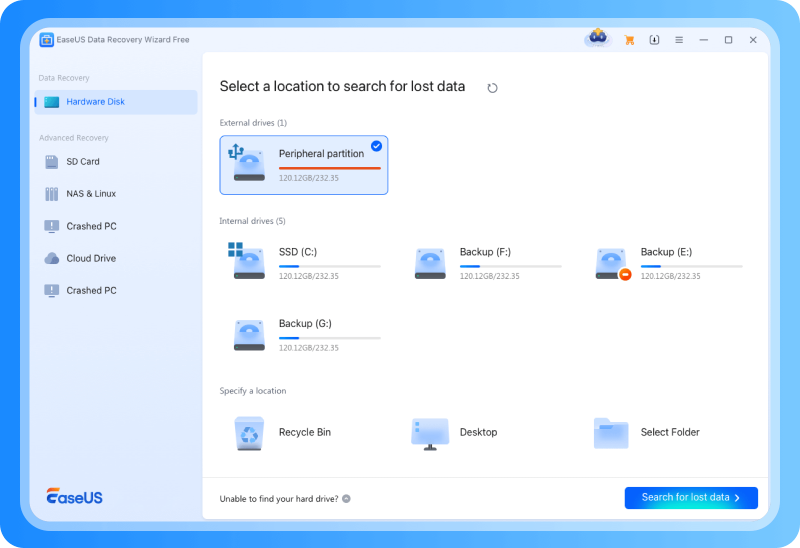
Most people searching for EaseUS are looking for EaseUS Data Recovery Wizard Pro. The official page currently describes EaseUS Data Recovery Wizard 19.2 and says it can recover data lost through deletion, formatting, partition loss, crashed or unbootable systems, virus attacks, USB drives, SD cards, cameras, and other devices. It also lists 2000+ storage devices and 1000+ file formats, plus a company-reported 99.7% recovery rate.
Those are broad claims, so interpretation matters. The device and format coverage is useful because real data loss often involves mixed file types, external drives, SD cards, and old folders. The recovery-rate number should be treated as an EaseUS marketing claim unless you have an independent benchmark that matches your device and loss scenario.
The buyer-protective feature is preview. EaseUS says the recovery workflow lets users select a location, scan, preview, and recover lost data. In a data-loss case, preview is the step that can save money. If the missing files appear and can be saved to a different drive, a paid license may make sense. If the target files do not appear, paying is unlikely to change that specific case.
TechRadar updated its EaseUS Data Recovery Wizard Pro review in April 2026. It reported monthly, yearly, and lifetime pricing at $69.95, $99.95, and $149.95, described a free version with up to 2GB recovery, and highlighted quick and deep scan modes, preview, and wide device and file support. It also noted that cheaper options exist. That matches the practical buying view: useful, but not automatically the cheapest one-time recovery path.
Safer Recovery Workflow Before You Pay
The worst recovery mistake is continuing to write data to the same drive. Deleted files are often recoverable only until new data overwrites the storage blocks. That is why the first step is not checkout; it is damage control.
Use this sequence before buying:
- Stop using the affected drive as much as possible.
- Install recovery software on another drive if you can.
- Scan the affected drive or card.
- Preview the files you actually need.
- Save recovered files to a different disk.
- Pay only if the preview shows the files that justify the license.
Community recovery discussions add an important caution. A long-running Reddit thread in r/datarecovery includes complaints about refund expectations, failed recovery outcomes, and upsell frustration. Reddit is not a controlled test, but those complaints are relevant because recovery purchases happen under stress. If the files are irreplaceable and the drive clicks, overheats, repeatedly disconnects, or shows hardware errors, consumer software may be the wrong first move. A professional recovery service can be expensive, but repeated scans on failing hardware can make outcomes worse.
EaseUS also publishes a refund policy that says refunds are generally available within 30 days, but it lists exceptions, including cases where the product has already performed the intended task or support can provide a solution. Buyers should treat that as a conditional policy, not a no-questions-asked trial.
Todo Backup: Less Urgent, Often Healthier

Data recovery is what you try after something goes wrong. Backup is what keeps the accident from becoming permanent. For many students, creators, and small teams, EaseUS Todo Backup is less dramatic than Data Recovery Wizard but more useful over time.
The official Todo Backup Home page lists app data backup for Outlook emails, Chrome settings, and game files; Security Zone protection; personal backup and restore; system cloning; system transfer; and a 30-day 250GB cloud storage trial. It also describes disk and system cloning, including moving an OS to an SSD and creating a bootable replacement drive.
The fit question is behavior, not feature count. Todo Backup fits users who will actually schedule backups, test restore paths, and keep copies away from the main device. If you only need basic file backup, built-in operating-system tools or cloud storage may be enough. If you manage recurring course assets, video edits, research files, or client documents, a guided backup product can reduce the chance that one failed drive turns into a business interruption.
For broader digital-risk decisions, our F-Secure review covers security software trade-offs. If your main decision is education-platform selection rather than PC utility software, start with our online course buying guide.
Partition Master: Useful, but Back Up First

EaseUS Partition Master is aimed at disk layout work: resizing partitions, extending a system partition, converting disk formats, cloning partitions, migrating an OS to SSD or HDD, creating WinPE boot media, and repairing boot-related issues. The official Partition Master Pro page lists those functions and supports Windows 11, 10, 8.1, 8, 7, Vista, XP, and several Windows Server versions.
That makes the product useful during hardware upgrades or storage cleanup. It is also the area where users need the most discipline. A clear interface does not remove the risk of changing partitions. Before resizing, moving, converting, or cloning a drive, back up important files and close unnecessary software. EaseUS itself notes in its FAQ that locked files may require a reboot before resizing a partition.
G2's EaseUS Partition Master reviews include 2026 user comments praising the visual interface, cloning, OS migration, and partition resizing. They also mention limits in higher-tier features, reboot interruptions, and license friction. That is a fair summary of the product category: helpful when you have a real disk job, unnecessary if your storage layout is already stable.
Pricing and License Fit
EaseUS pricing can vary by product page, region, checkout path, and promotion. Based on official pages checked on May 19, 2026, Data Recovery Wizard Pro was listed at $69.95 for one month, $99.95 for one year, and $149.95 for lifetime upgrades. Todo Backup Home showed $39.95 on its product page. Partition Master Free showed a Pro offer at $19.95 on the free product page, while the Pro page emphasized plan features more than a single stable price in the crawled text.
That variability matters. The safe buying rule is to decide what the job is worth before opening checkout. A $69.95 recovery license can be rational for client files, a thesis draft, course recordings, or family media. It is harder to justify for a disposable download. A backup license makes sense if it becomes part of a real routine. A partition license makes sense when it saves a reinstall or supports an SSD migration.
Public review platforms are generally positive but not uniform. Software Advice lists EaseUS Todo Backup at 4.5 overall from 94 reviews, with ease of use, value, and functionality scores all above 4. G2 lists EaseUS Data Recovery with positive comments around scanning and previewing. Trustpilot's EaseUS page has a high aggregate score and many support-focused comments. These are useful buyer signals, but they do not guarantee recovery for a specific drive.
Who Should Consider EaseUS
Consider EaseUS if you want a guided Windows or Mac utility and have a concrete problem to solve. Good examples include a deleted folder, a formatted SD card, a Windows PC that needs scheduled image backups, an SSD upgrade, a partition resize, or a PC transfer before replacing hardware.
EaseUS also fits people who do not want command-line recovery tools or manual disk-management steps. That is not a weakness. In a stressful data-loss moment, a clear guided workflow can be worth paying for if the preview confirms that the files you need are recoverable.
Who Should Compare Alternatives First
Compare alternatives if your drive is physically failing, the recovery is mission-critical, or you need enterprise backup management. Clicking, grinding, disappearing from BIOS, or repeated disconnects are not normal software problems. Stop using the device and consider a professional recovery service.
Also compare if the job is small. Free built-in backup tools, cloud sync, or open-source utilities may be enough for basic needs. Mac-heavy users may want to compare macOS-focused tools. IT teams may prefer backup products with centralized management, audit logs, endpoint security integration, and policy controls.
For learning-platform decisions, our Coursera deep dive and 101 Blockchains review are more relevant than a PC utility purchase. EaseUS belongs in the local-data workflow, not in every education software shortlist.
FAQ
Is EaseUS safe to use? EaseUS is a long-running software company with official Windows and Mac utilities, support pages, and broad third-party review visibility. The safer approach is to download only from the official EaseUS site, avoid cracked installers, and install recovery software on a different drive from the one that lost data.
Can EaseUS recover everything? No. EaseUS can scan for deleted, formatted, lost-partition, inaccessible, and some crashed-system scenarios, but recovery depends on overwrite status and drive health. Preview the target files before paying, and do not repeatedly scan a physically failing drive.
How much does EaseUS Data Recovery Wizard cost? On the official product page checked on May 19, 2026, Data Recovery Wizard Pro was listed at $69.95 for one month, $99.95 for one year, and $149.95 for lifetime upgrades. Prices can vary by promotion and region, so verify checkout before purchase.
Is EaseUS Todo Backup worth using? It can be worth using if you will schedule backups and test restores. The product fits people who want guided file, disk, system, and cloning workflows. If you only need simple folder sync, built-in OS tools or cloud storage may be enough.
Should I use Partition Master before upgrading to an SSD? Partition Master can help with cloning, resizing, and OS migration, but back up first. Partition changes are high-stakes operations. A simple interface reduces friction, but it does not remove the risk of user error, power failure, or pre-existing disk problems.
Does EaseUS have a refund policy? EaseUS publishes a 30-day refund policy, but it includes conditions and exceptions. Read the policy before buying, keep screenshots of checkout terms, and use scan or trial features first so the purchase is based on visible results.
Bottom Line
EaseUS is a credible utility brand when the job is concrete: recover visible files, set up backups, clone a drive, resize partitions, or move data to a new PC. Data Recovery Wizard is the clearest reason to consider it, while Todo Backup and Partition Master make sense when they become part of a real maintenance workflow.
The main buying rule is restraint. Scan first, preview first, and pay only when the product is solving a specific problem. EaseUS can be useful in a bad data moment, but the better long-term outcome is a backup routine that means you never need recovery software under pressure.
References
- EaseUS company page
- EaseUS Data Recovery Wizard Pro official page
- EaseUS Todo Backup Home official page
- EaseUS Partition Master Pro official page
- EaseUS refund policy
- TechRadar EaseUS Data Recovery Wizard Pro review
- Software Advice EaseUS Todo Backup reviews
- G2 EaseUS Partition Master reviews
- Trustpilot EaseUS reviews
- Reddit r/datarecovery discussion about EaseUS complaints
Title Candidates
- EaseUS Review 2026: Recovery, Backup, Pricing, and Buyer Risks (specificity + buyer intent)
- Is EaseUS Worth It? Recovery Strengths and Safer Buying Checks (question + risk reduction)
- EaseUS Data Recovery Review: What to Check Before You Pay (pain point + practical outcome)
- EaseUS Pricing and Review: When the Utility Suite Makes Sense (pricing curiosity + fit framing)
- EaseUS Review: The Backup and Recovery Trade-Offs That Matter (contrarian focus + trust building)