This review is based on current Skillshare platform data, published instructor information, user reviews across Trustpilot and learning platform aggregators, and direct comparison with competing platforms. AspectsInspire does not fabricate first-hand testing claims — where we reference class quality or platform behavior, we cite publicly available evidence.
What Skillshare actually is — and what it is not
Skillshare is a subscription-based online learning platform focused on creative and applied skills. You pay one annual fee — $167.88/year — and get unlimited access to more than 30,000 classes taught by working professionals. The platform's identity is built around project-based learning: every class ends with a hands-on assignment designed to produce a portfolio piece, not just passive video consumption.

What Skillshare is not is a credential platform. There are no completion certificates, no university partnerships, no academic accreditation. If your goal is a professional certificate for LinkedIn or a career-track credential, Coursera or a structured bootcamp will serve you better. Skillshare's value proposition is skill acquisition through doing — and for creative fields, that distinction matters more than a certificate.
The platform also is not a marketplace. Unlike Udemy, where you buy individual courses, Skillshare operates on a Netflix-style subscription. This changes how you use it: instead of researching one perfect course, you browse, sample, and move between classes freely. That model rewards curiosity but punishes infrequent use — if you only watch one class per month, you are effectively paying $14 for a single short course.
Pricing breakdown: what you actually pay
Skillshare has simplified its pricing to a single individual plan with an annual billing cycle:
| Plan | Cost | Per-month equivalent | Free trial |
|---|---|---|---|
| Individual (Annual) | $167.88/year | ~$13.99/month | 7 days |
| Individual (Monthly via mobile) | ~$32/month | $32/month | 7 days |
| Teams (25+ seats) | $159/seat/year | ~$13.25/month | Custom demo |
| Student (.edu email) | ~$84/year | ~$7/month | 7 days |
The annual plan is the only option on the web. Monthly billing is available exclusively through iOS and Android apps, and at roughly $32/month, it costs more than double the annualized rate. If you are testing the platform, start with the 7-day free trial and cancel before it converts — Skillshare does not offer refunds on annual memberships.
The student discount is significant: a verified .edu email address gets you 50% off the annual rate, bringing the cost to roughly $84/year. Skillshare also offers scholarships for eligible applicants, though availability varies.
For context on when to buy and when to wait for deals, our course deals seasonal guide covers discount patterns across all major learning platforms.
The class library: strong in creative, thin elsewhere
Skillshare's catalog of 30,000+ classes sounds enormous, but the distribution is uneven. The platform's strength is concentrated in four main pillars:

Where Skillshare excels
Illustration and fine art — This is Skillshare's crown category. Classes on Procreate, watercolor, figure drawing, lettering, and digital illustration dominate the platform's most-enrolled list. Brooke Glaser's "Intro to Procreate" class alone has over 114,000 students. Other standout instructors include Tom Froese (award-winning illustrator), Peggy Dean (botanical illustration, 4.8/5 rating), and Zaneena Nabeel (abstract watercolor).
Graphic design and branding — Aaron Draplin, one of the most recognizable names in American graphic design, teaches logo design and branding classes that have become platform staples. Ellen Lupton's "Graphic Design Basics" has enrolled over 161,000 students. You will also find solid classes on Figma, Canva, typography, and layout fundamentals.
Photography and video — Dale McManus's iPhone photography class has drawn 161,000+ students, and Jordy Vandeput covers video editing and Adobe Premiere Pro for beginners. The photography section covers both mobile and DSLR workflows, composition, editing in Lightroom, and commercial photography basics.
Animation and motion graphics — Classes on After Effects, Blender, character animation, and motion design fill a niche that few competing platforms serve as well at this price point.
Where Skillshare is thinner
Programming and technical courses — Skillshare has classes on Python, JavaScript, and web development, but the depth and rigor do not match platforms like Udemy (210,000+ courses) or Codecademy. If coding is your primary goal, you will find better structured learning paths elsewhere.
Business and marketing — While the platform covers freelancing, social media marketing (Maggie Stara's content creation class has 38,000+ students), and entrepreneurship basics, it lacks the case-study depth and academic rigor you get from Coursera's university-backed business programs.
Academic and professional development — No accredited content, no professional certificates, no university partnerships. This is a deliberate trade-off, not an oversight — Skillshare is built for practitioners, not credential seekers.
The project-based learning model
This is Skillshare's most important differentiator, and it is worth examining in detail.

Every Skillshare class includes a class project — a structured assignment that asks you to apply what you learned. In an illustration class, you might create a character sheet. In a branding class, you might design a logo for a fictional client. In a photography class, you might shoot and edit a series using specific techniques from the lesson.
This matters because creative skills are fundamentally output-driven. Watching a 45-minute video on color theory teaches you concepts; completing a project that forces you to apply color theory teaches you the skill. Skillshare reports that project-based classes see 30% higher completion rates compared to traditional video-only courses, and anecdotally, the student project galleries confirm active participation.
Student project galleries

Each class has a public project gallery where students upload their work. This serves three purposes:
- Accountability — Knowing your project will be visible motivates completion
- Community feedback — Other students and sometimes the instructor comment on uploaded projects
- Portfolio building — You can link directly to your Skillshare projects from a personal portfolio or CV
The project gallery is also Skillshare's answer to the "no certificates" limitation. You cannot prove you completed a class with a credential, but you can prove it with a tangible output. For creative fields, a portfolio of work generally carries more weight than a certificate anyway.
Learning Paths: structured sequences for skill building
One of Skillshare's more recent additions is Learning Paths — curated sequences of classes that build toward a specific skill goal.
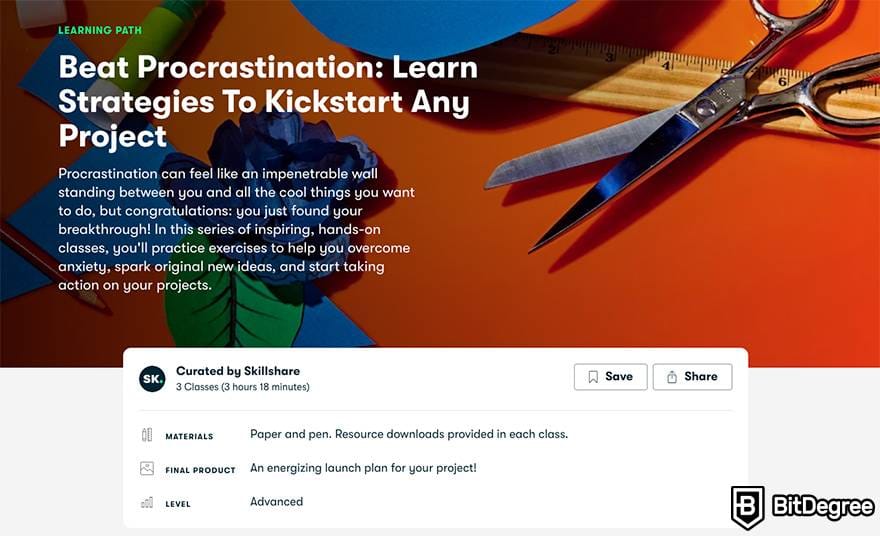
Instead of choosing from 30,000 classes with no guidance, a Learning Path bundles 5-10 related classes in a recommended order. Examples include paths for "Getting Started with Illustration," "Freelance Design Fundamentals," and "Photography for Social Media." Each path includes estimated time to complete and prerequisite recommendations.
This partially addresses one of the biggest criticisms of Skillshare: the lack of structure. On Udemy, you buy a single comprehensive course that takes you from A to Z. On Coursera, you follow a university-designed specialization. Skillshare's buffet model offers freedom but not direction — Learning Paths add a layer of curation without sacrificing the subscription's flexibility.
That said, Learning Paths are still relatively new and not available for every topic. If your area of interest does not have a curated path, you are back to browsing and self-directing your learning sequence.
Instructor quality: the open-platform trade-off
Skillshare's instructor roster includes genuinely impressive working professionals. Aaron Draplin (graphic design), Ali Abdaal (productivity), Tom Froese (illustration), Daniel Scott (certified Adobe instructor), and Lisa Bardot (Procreate) are all accomplished practitioners teaching what they do daily.
But Skillshare has an open-platform model — anyone can apply to teach. This means the 9,000+ instructors on the platform vary dramatically in teaching ability, production quality, and subject expertise. Some classes feel polished and professionally produced; others are essentially screen recordings with minimal editing and no structured curriculum.
How to identify quality classes
Since there is no formal vetting process, learners need to self-filter:
- Check enrollment numbers — Classes with 10,000+ students have been validated by the community
- Read project gallery activity — Active project galleries indicate the class drives engagement
- Look for "Top Teacher" badges — Skillshare designates high-performing instructors with this label
- Preview before committing — Every class has a trailer; watch it to assess production quality and teaching style
- Check class length — Very short classes (under 15 minutes) are often thin on substance
The subscription model actually helps here. Because you are not paying per class, a bad class costs you time but not money. You can abandon a weak class after five minutes and move to another — a luxury the per-course Udemy model does not offer.
Community features and engagement
Skillshare invests more in community than most learning platforms. Beyond project galleries, the platform offers:
- Discussion boards per class for Q&A and peer interaction
- Monthly challenges that encourage focused skill-building around a theme
- Live workshops — interactive sessions where instructors teach in real-time and take questions
- A social feed where you can follow instructors and other learners
Roughly 65% of active students engage in some form of collaborative activity, according to Skillshare. This community layer matters for creative fields where feedback loops accelerate improvement — seeing how 500 other students interpreted the same project brief teaches you as much as the class itself.
Who Skillshare is actually for
Based on the platform's strengths and limitations, here is an honest assessment of who benefits most — and who should look elsewhere.
Skillshare works well for:
- Creative hobbyists who want to explore illustration, photography, design, or animation without committing to a single expensive course
- Freelancers building a portfolio and learning practical skills like client communication, branding, or social media content creation
- Career explorers who are curious about creative fields but not ready to invest in a bootcamp or degree program
- Active learners who will take 3+ classes per month and use the project system to build tangible outputs
- Students who can access the 50% discount and use Skillshare alongside their formal education
Skillshare is the wrong choice for:
- Career changers who need a recognized credential — Coursera, edX, or a coding bootcamp will serve you better (see our online course buying guide for framework on this decision)
- Advanced technical learners who need deep, comprehensive programming or data science courses
- Infrequent learners who will only use the platform once or twice per month — individual Udemy courses offer better per-unit value at that usage level
- Anyone needing certificates for professional development requirements, continuing education credits, or employer reimbursement
How Skillshare compares to alternatives
Understanding Skillshare's position requires comparing it against the platforms most learners consider alongside it:
| Feature | Skillshare | Udemy | Coursera | MasterClass |
|---|---|---|---|---|
| Model | Subscription | Per-course | Subscription + per-course | Subscription |
| Price | $167.88/year | $10-$200/course | $59/month (Plus) | $120/year |
| Catalog size | 30,000+ | 210,000+ | 7,000+ | 200+ |
| Creative strength | Excellent | Good | Limited | Celebrity-led |
| Certificates | None | Yes (non-accredited) | Yes (university-backed) | None |
| Projects | Every class | Some courses | Some courses | Workbooks only |
| Best for | Creative skill-building | One-off technical learning | Career credentials | Inspiration |
vs. Udemy — Skillshare wins on creative topics and the subscription model's freedom to explore. Udemy wins on catalog size, technical depth, and flexibility for learners who want one specific course without a recurring commitment. For a deeper comparison of platform models, see our Coursera vs Udemy breakdown.
vs. Coursera — These platforms barely compete. Coursera is for credentials and career advancement through university-backed programs. Skillshare is for practical creative skill-building. If you need both, you would use both. Our Coursera deep dive covers the credential side in detail.
vs. MasterClass — MasterClass offers cinematic, celebrity-taught classes focused on inspiration and philosophy. Skillshare offers practitioner-taught classes focused on hands-on skill execution. MasterClass tells you how Gordon Ramsay thinks about cooking; Skillshare teaches you how to actually use Procreate. Our Skillshare vs MasterClass comparison breaks this down fully.
The bottom line on value
Skillshare's value equation is straightforward arithmetic. At $167.88/year, you need to complete roughly 3 classes per month to bring your per-class cost below $5 — competitive with discounted Udemy courses. At 7-8 classes per month, you are below $2 per class. At that usage level, no other platform offers comparable value for creative content.
The risk is the opposite scenario: paying annually, using the platform for two months, then forgetting about it. Skillshare does not offer refunds, and the annual billing model means you are committed once the trial converts. If you are unsure about your usage pattern, take the 7-day free trial, set a calendar reminder to cancel on day 6, and track how many classes you actually complete. If you finish three or more classes in a week, the annual plan will almost certainly pay for itself.
For creative learners who will use the platform actively, Skillshare remains the most cost-effective way to build practical skills through guided projects. It is not the only platform you will ever need — but for illustration, design, photography, and applied creative skills, it is the one most worth subscribing to.