EaseUS coverage hub: recovery, backup, pricing, and buyer risks
Searching for EaseUS usually means something has gone wrong. A project folder disappeared, a memory card looks empty, a laptop will not boot, or a drive upgrade suddenly feels more technical than expected. That is not a normal buying moment. Stress makes software pages sound more persuasive, and recovery software is easiest to overbuy when you are worried.
This hub gives AspectsInspire one stable place for EaseUS coverage. The short version: EaseUS can be useful when the job is specific and valuable enough to justify a paid utility. It is not a guarantee. Before paying, scan first, preview first, check the refund terms, and avoid writing new data to the drive that lost files.
We may earn a commission from sponsored links on this page. That does not change our editorial view. Our review standards are explained in the editorial policy, and the site background is on the About page.
EaseUS review: what the brand covers
EaseUS is a utility software company, not a single app. The official EaseUS homepage groups the product family around data recovery, backup, partition management, disk copy, PC transfer, multimedia tools, mobile utilities, and PDF tools. For most readers, three jobs matter most: recovering files after a loss event, protecting files before a loss event, and managing storage during a drive upgrade or PC migration.
The clearest product is EaseUS Data Recovery Wizard. The official page says the current Windows product supports lost-data scenarios such as deletion, formatting, OS crash, virus infection, inaccessible partitions, USB drives, memory cards, cameras, and external drives. It also lists 1000+ file formats and 2000+ storage devices. Treat those as official coverage claims, not a promise that one specific damaged drive will recover cleanly.
For the deeper editorial review, start with our EaseUS review. If you are seeing a merchant-tracked version of the same buyer intent, our EaseUS 2026 review covers similar recovery, backup, and pricing cautions with a conversion-focused structure.
Product line snapshot
| Product area | Main job | Strong fit | Main caution |
|---|---|---|---|
| Data Recovery Wizard | Recover deleted, formatted, or inaccessible files | You can preview the exact files before paying | Recovery depends on overwrite status and drive health |
| Todo Backup | Back up, restore, and clone local data | You will schedule backups and test restores | Built-in OS backup may be enough for simple folder protection |
| Partition Master | Resize, clone, convert, and manage partitions | You are upgrading drives or reorganizing storage | Partition changes are high-risk without a backup |
| Disk Copy and PC transfer tools | Clone disks or move files, apps, and settings | You have a one-time migration or replacement workflow | A broad license may be unnecessary for a small job |
That table is the buying lens. EaseUS is most useful when you can name the job in one sentence. If the job is vague, wait. Utility software should solve a current problem or prevent a clear future one.
Data recovery: scan and preview before checkout
Data recovery is the most emotionally loaded EaseUS use case. The important rule is simple: do not make the drive worse. If files disappeared from a drive, card, or partition, stop writing new data to that device. Install recovery software on another drive if possible. Save recovered files somewhere else.
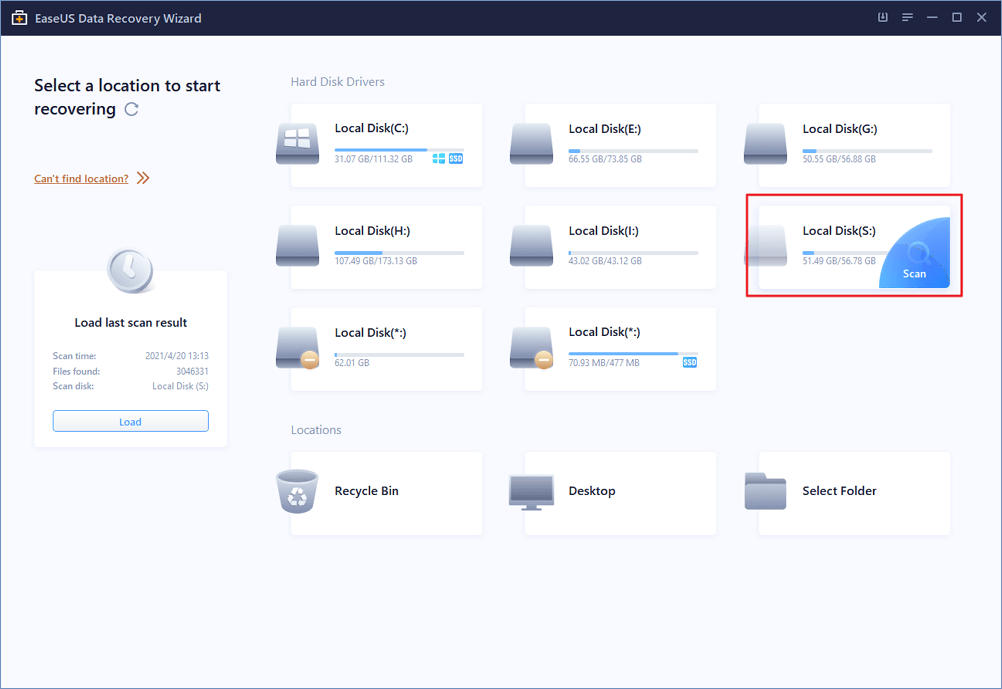
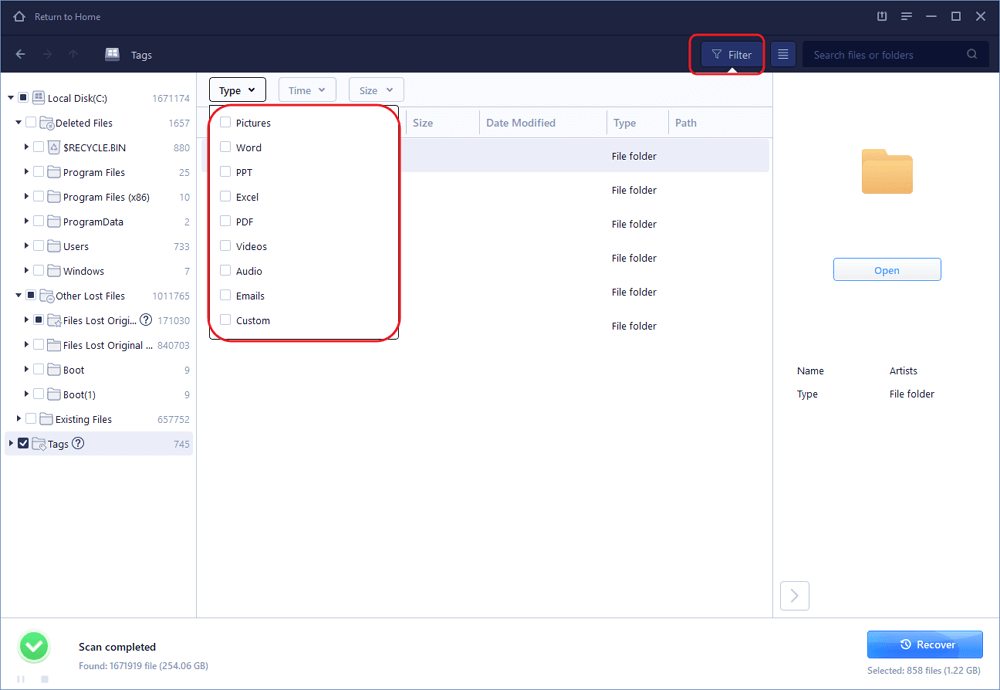
EaseUS is attractive because the workflow is guided: select a location, scan, filter, preview, and recover. Preview is the buyer-protection step. If the target files are visible and can be previewed, a paid license may be rational. If the files are not visible, paying is unlikely to change that specific case.
TechRadar's April 2026 Data Recovery Wizard Pro review describes quick and deep scan modes, a modern interface, free recovery allowance, and pricing that sits near mainstream recovery software rather than bargain tools. It also notes that cheaper options exist. That matches the practical view: EaseUS can be a reasonable guided recovery tool, but it should not replace caution.
If the drive clicks, overheats, disappears from BIOS, repeatedly disconnects, or contains irreplaceable business data, stop scanning and compare professional recovery options. Consumer recovery software is for logical loss on a reasonably healthy device, not every physical failure.
Backup and disk management: less urgent, often more valuable
Recovery is what you try after a mistake. Backup is how you avoid turning that mistake into a crisis. The official Todo Backup Home page covers disk and system cloning, Security Zone, Smart Backup, WinPE bootable disk, hot backup, mount and unmount workflows, and recovery environment features. For a solo course creator or small education team, the useful question is not whether every feature exists. It is whether you will schedule backups and test restore paths.
EaseUS Partition Master sits in a different workflow. The official Partition Master Pro page describes resizing and extending partitions, cloning disk partitions, migrating OS to SSD or HDD, converting MBR to GPT, creating WinPE bootable media, and checking file-system issues. Those are real jobs during storage upgrades and PC maintenance.

The risk is that disk management has consequences. A clean interface does not remove the need for a backup. Before resizing, converting, cloning, or migrating partitions, back up important files and close unnecessary software. If a disk is already unstable, treat the operation as a recovery problem first, not a tidy-up task.
Pricing, refunds, and user signals
EaseUS pricing changes by product, term, region, store, and promotion. The safest advice is to use the official checkout page as the source of truth on the day you buy. Do not rely on an old review snippet for final price.
The refund policy also deserves a careful read. EaseUS publishes a refund policy with a 30-day window, but the page lists exceptions. Refunds may be limited for non-technical reasons, third-party reseller purchases, or cases where the product has already performed the intended task. That does not make the policy unusable; it means you should scan, preview, and document the checkout path before paying.
Public review signals are broadly positive but should be read as buyer context, not lab proof. G2's EaseUS Data Recovery page shows a 4.8 rating from hundreds of reviews and highlights ease of use, preview before recovery, and free-version limits as recurring themes. Capterra's EaseUS Data Recovery Wizard page shows strong ease-of-use and customer-service scores. Those signals support the idea that EaseUS is approachable for non-technical users, while still leaving recovery outcomes case-by-case.
How this hub connects to our other coverage
Use this hub when you want the quick map. Use the full review when you need the buying decision.
Start here:
- Read the full EaseUS review for data recovery, backup, pricing, and trade-offs.
- Read the alternate EaseUS 2026 review if you are comparing a merchant-tracked offer.
- Read our F-Secure review if your main concern is security, identity protection, VPN, or scam protection.
- Read the online course buying guide if you came here from education software research rather than a local PC utility problem.
This structure matters for search quality. The brand hub should answer "what is EaseUS and where should I go next?" The deep-dive review should answer "should I pay?" Keeping those jobs separate helps readers and reduces duplicate thin pages.
Buying checklist before you choose EaseUS
Use this checklist before paying:
- Name the job: recovery, backup, partition management, cloning, or PC transfer.
- If recovering files, stop using the affected drive.
- Download only from the official EaseUS site.
- Scan and preview target files before buying.
- Save recovered files to a different drive.
- Read the refund policy before checkout.
- Check whether you are buying direct from EaseUS or through a reseller.
- Confirm whether the license is Windows, Mac, monthly, yearly, lifetime, or one-week.
- Back up before using partition or clone tools.
- Do not use consumer software as the first move for physically failing drives.
FAQ
Is EaseUS safe to use?
EaseUS is a long-running utility software brand with official Windows and Mac products, public support pages, and broad review visibility. Safe use still depends on downloading from the official site, avoiding cracked installers, and not installing recovery software onto the same drive that lost data.
Can EaseUS recover every deleted file?
No. Recovery depends on whether the file data has been overwritten, whether the file system is readable, and whether the device is physically healthy. Preview the target files before paying. If the drive shows physical failure signs, compare professional recovery options first.
Which EaseUS product should I start with?
Start with the job. Use Data Recovery Wizard for lost files, Todo Backup for scheduled backup and cloning, Partition Master for partition and disk-management work, and transfer tools for PC replacement workflows.
Is EaseUS worth paying for?
It can be worth paying for when the lost or protected data is more valuable than the license and the tool visibly solves the job. It is harder to justify when you only need a small recovery, already have a working backup, or cannot preview the files you need.
Does EaseUS offer refunds?
EaseUS publishes a 30-day refund policy, but there are exceptions. Read the policy before buying, keep checkout records, and use scan or trial features first so the purchase is based on visible results.
Should students or course creators use EaseUS?
They should consider it when the problem is local data: lost lesson files, course videos, research notes, client spreadsheets, backup routines, or laptop upgrades. If the real decision is choosing a course platform, start with our online course buying guide instead.
Bottom line
EaseUS is credible when the job is concrete. It can help with file recovery, backup routines, disk cloning, partition management, and PC transfer. It is not a blanket guarantee, and it is not the first move for physically failing drives.
The disciplined path is the same across the product family: define the job, protect the data, preview before paying, check the policy, and use the full review when you need a deeper decision.
References
- EaseUS official homepage
- EaseUS Data Recovery Wizard Pro official page
- EaseUS Todo Backup Home official page
- EaseUS Partition Master Pro official page
- EaseUS refund policy
- TechRadar EaseUS Data Recovery Wizard Pro review
- G2 EaseUS Data Recovery reviews
- Capterra EaseUS Data Recovery Wizard reviews
Title Candidates
- EaseUS Coverage Hub: Recovery, Backup, Pricing, and Buyer Risks Before You Pay - pain point plus risk reduction
- EaseUS Review Map: Which Recovery, Backup, or Disk Tool Fits Your Problem? - question plus decision routing
- Before You Pay for EaseUS: Recovery Limits, Backup Uses, and Refund Checks - caution plus practical checklist
- EaseUS Data Recovery and Backup Guide: What to Verify First - direct intent plus action
- Is EaseUS Worth It? A Practical Hub for Recovery, Backup, and Disk Tools - buyer question plus scope clarity