This Pics Art review uses the spaced brand phrase because many people search that way. The official brand is Picsart. We checked official Picsart pages, app store listings, privacy and terms pages, and independent review signals on May 19, 2026. We did not run a paid classroom deployment or first-hand refund test. Our review standards are described in our editorial policy, and you can learn more about Aspects Inspire on our about page.
Pics Art Review: AI Photo Editor, Pricing, Privacy, and Course-Creator Fit
A course creator can spend three hours recording a lesson, then lose another hour making the thumbnail, cropping a portrait, cleaning a background, resizing a social post, and turning the same idea into a short video. That is the practical problem behind this Pics Art review. You are not only buying a photo editor. You are deciding whether Picsart can become the quick creative layer around your learning content.
The short version: Picsart is useful when you need fast, mobile-friendly visual production for thumbnails, lesson graphics, social posts, student projects, and simple video assets. It is less convincing if you need a full learning platform, advanced desktop publishing, strict privacy minimization, or subscription terms you can understand without checking the store and checkout screens carefully.
Pics Art review: what Picsart actually is
Picsart describes itself as an AI creative platform for photo editing, video editing, templates, stickers, and generative design. Its official About page says the company was founded in 2011 and reports 150M+ monthly active users, 1B+ edits per month, active creators in 180 countries, and 30 supported languages. Treat those as company-reported scale figures, not independent audit numbers, but they show that Picsart is a mature creative platform rather than a small one-off app.
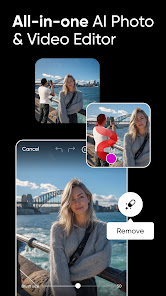
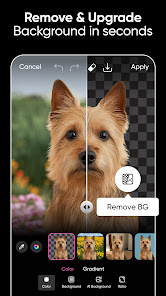
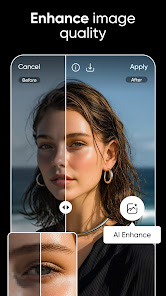
The product spans mobile apps, a browser editor, AI tools, templates, community assets, and business-facing APIs. The official AI photo editor page lists tools for background removal, object replacement, photo retouching, AI Enhance, AI Image Extender, AI Logo Generator, AI filters, and AI style transfer. The Google Play listing adds photo filters, background eraser, object remover, curated images, text with 200+ fonts, collage tools, stickers, video editing, and drawing tools.
For education buyers, that means Picsart sits around the course production workflow. It is not a course marketplace like Udemy, a professional certificate catalog like Coursera, or an LMS. It helps with the visual assets that sit beside a course: thumbnails, cover art, worksheets, announcement graphics, posters, social posts, intro clips, student project visuals, and lightweight marketing creatives.
AI photo and video tools for course creators
Picsart is strongest when speed matters more than pixel-perfect control. A solo course creator can remove a background from a speaker headshot, generate a clean backdrop for a webinar promo, enhance a low-quality image, resize a graphic for several social channels, and add text or stickers without opening a complex desktop editor.
That workflow is useful for small education teams. A training business can build quick promo assets for a cohort launch. A teacher can make a simple classroom poster or student project graphic. A student creator can turn a presentation idea into a more polished image. A creator selling on Skillshare or running independent workshops can produce thumbnails and social clips faster than starting from a blank canvas.
The caution is quality control. AI background removal and image enhancement can save time, but they still need human review. Small artifacts around hair, hands, logos, text, or product edges can make an educational asset look careless. If an image represents a real student, institution, certificate, product, or claim, review the edit before publishing.
Pricing, plans, and subscription risk
Picsart pricing is plan-based and can vary by region, platform, billing term, and store. The official pricing page currently presents Pro, Ultra, and Enterprise. Pro is framed for everyday creative work, with photo and video editing features, background and object removal, templates, brand kits, bulk editing up to 50 images, cloud storage, and monthly credits. Ultra is positioned for heavier AI use and teams, with more credits, more brand kits, team seats, ad variation and localization tools, API credits, larger bulk editing, and more storage. Enterprise is custom priced and includes SDKs, APIs, white-label options, enterprise security, SLAs, and dedicated account management.
The app stores also matter. The Apple App Store listing shows Picsart as free with in-app purchases and lists examples such as Picsart Pro Annual, Picsart Gold Annual, monthly plans, weekly plans, and Plus plans. Those examples are store-specific and can change, but they show why buyers should check the exact purchase path before starting a trial.
For course creators, the pricing question is not whether the first edit feels good. It is whether the paid tier will be used every week. If you only need one thumbnail per month, a subscription may be wasteful. If you publish social posts, course updates, worksheet visuals, and short videos every week, the time saved can justify a paid plan. Before subscribing, check renewal date, trial length, platform of purchase, cancellation path, credit limits, export limits, watermark behavior, and whether the same benefits work across mobile and web.
Mobile apps, web editor, and team workflows
Picsart has unusually broad mobile reach. Google Play lists the app with 1B+ downloads, 12.2M reviews, and a 3.7 rating at the time checked. The App Store lists a 4.7 rating from 1.2M ratings, Editors Choice recognition, and support for iPhone, iPad, Mac with Apple silicon, and Apple Vision. Ratings change, but these app store signals confirm that Picsart is widely used as a mobile creative tool.
That mobile-first strength matters for creators who work between devices. You might capture a classroom photo, clean it on a phone, finish text on a laptop, and export a social asset before a live workshop. The official pricing page also says subscription benefits can work across iOS, Android, web, and Microsoft Store when users log into the same account used for purchase.
For teams, the picture is more mixed. Brand kits, bulk editing, cloud storage, and team seats point toward small business use. The separate Picsart.io site shows developer and business options such as photo and video editor SDKs, remove background APIs, upscale APIs, GenAI APIs, plugins, automation integrations, and white-label or configurable editor options. That is relevant if an education SaaS company wants embedded editing inside its own product. It is overkill if a small course team only needs a few social graphics.
Privacy, data, and content rights
Privacy is one of the main reasons to slow down before using Picsart for education workflows. Google Play says the app may share personal info, photos and videos, and other data types with third parties, and may collect personal info, financial info, photos and videos, and other categories. The App Store privacy section says identifiers may be used to track users across apps and websites, and lists purchases, contact info, user content, search history, identifiers, usage data, and diagnostics as data linked to the user.
Picsart's Privacy Policy also describes cookies, tracking pixels, analytics providers such as Google Analytics, Crashlytics, Firebase, and Facebook, and interest-based advertising. That does not automatically make Picsart unsuitable, but it does make it a poor fit for sensitive student records, private classroom photos, identifiable minors, health information, or protected institutional data unless your organization has reviewed the policy and controls.
The Terms of Use are also worth reading. Picsart says it does not claim ownership rights in user content except Picsart content, but it also requires a broad license to host, reproduce, distribute, create derivative works, display, and perform user content in connection with the service and business, subject to privacy settings and sharing context. For normal social graphics, that may be acceptable. For confidential course materials, student work, unreleased brand assets, or paid curriculum, keep originals outside the platform and avoid uploading sensitive material unless the terms fit your risk level.
Where Picsart fits in an education content stack
Picsart fits the production layer, not the learning layer. Use it when the output is visual: a course thumbnail, worksheet cover, lesson slide image, social post, short promo video, event poster, certificate-style graphic, or student project visual. Do not expect it to manage enrollments, quizzes, grading, cohorts, certificates, or learning analytics.

If you are deciding what to learn or which course platform to buy, start with our online course buying guide. If you are comparing creative course subscriptions, our Skillshare deep dive is a better match. If your pain is lecture capture and meeting notes, read our Otter AI review. If your school needs governed file storage and content workflows, our Box review covers a different layer.
Picsart is most useful when those other decisions are already made and you need faster creative output around them. A small training business can make launch graphics. A creator can generate multiple thumbnail options. A student can build a project poster. A marketing assistant can resize campaign visuals. That is a real job, but it is narrower than a full education platform.
Reputation signals and user sentiment
Public feedback is mixed in a familiar way for subscription creative apps. Trustpilot showed a 4.3 rating from 704 reviews when checked, with 61% 5-star and 27% 1-star ratings, and the page says Picsart replied to 95% of negative reviews. Recent positive reviews often mention ease of use and editing value. Negative review themes on public platforms frequently involve subscriptions, refunds, support, ads, or AI-heavy product direction.
An independent Style Factory review described Picsart as capable for photo editing, visual design, short-form content, and AI generation, while noting weaker fit for layout-heavy work, typography, and support depth. That matches the practical buyer view: Picsart is good for fast creative assembly, but it is not a replacement for every professional design, publishing, or brand governance workflow.
For course creators, the safest interpretation is to run a small test. Create three real assets: a course thumbnail, a social post, and a short promo visual. Export them. Check watermark behavior, quality, template flexibility, brand consistency, and how long the process takes. Then decide whether the subscription is recurring infrastructure or just a one-off convenience.
Who should consider Picsart
Consider Picsart if you publish content often and need a fast editor that works across phone and browser. It is especially useful for creators who need many small visuals rather than one polished brand campaign. Course thumbnails, Instagram posts, TikTok or Reels covers, student project posters, creator headshots, and simple promo videos are natural fits.
It can also fit small training businesses that lack a dedicated designer. Brand kits, templates, background removal, batch editing, and AI tools can help a small team keep a consistent look without building every asset from scratch.
Education SaaS teams should look at Picsart differently. The consumer app may help marketing teams. Picsart.io may matter if the product itself needs embedded editing, background removal, image enhancement, or API-driven creative workflows. Those are different buying motions and should not be evaluated with the same checklist.
Who should compare alternatives first
Compare alternatives first if your main work is slide decks, long documents, print layout, high-control typography, institutional brand governance, or privacy-sensitive student content. Picsart can make attractive quick visuals, but it is not a full design operations system.
Also compare alternatives if you dislike subscription complexity. App store subscriptions, trials, credits, annual billing, and platform-specific purchases can create confusion. Before entering payment details, confirm the exact plan, renewal amount, cancellation route, refund policy, and whether you bought through Picsart, Apple, Google, Microsoft, or another store.
Finally, be careful if you are working with minors, private classrooms, protected student information, or unpublished curriculum. For those workflows, ask your institution or legal team before uploading materials to any consumer creative app.
Buying checklist before you choose Picsart
- Check whether you need Picsart weekly, not just once.
- Confirm the paid plan, billing term, renewal date, and cancellation path.
- Test exports for watermark, size, quality, and format limits.
- Review AI credit limits and whether failed generations return credits.
- Read privacy labels before uploading student or client content.
- Keep original course assets outside Picsart.
- Test one thumbnail, one social post, and one short video before paying.
- For team use, check brand kits, storage, seats, and approval workflow needs.
- For embedded product use, evaluate Picsart.io separately from the consumer app.
FAQ
Is Pics Art the same as Picsart?
Yes for search intent. The official brand is Picsart, one word. Many users search for Pics Art with a space, so this review uses the spaced phrase in the title while referring to the official brand as Picsart in source-backed sections.
Is Picsart free to use?
Picsart has free access through its apps and web editor, but many advanced tools, premium assets, AI usage, storage, ad-free editing, and team features are tied to paid plans or in-app purchases. Check the current checkout screen before starting a trial.
Is Picsart good for course creators?
Picsart can be useful for course creators who need thumbnails, social graphics, lesson visuals, posters, and short promo assets. It is not a course platform, LMS, student management system, or assessment tool.
What is the main risk with Picsart?
The main risks are subscription clarity, AI credit limits, privacy labels, and content rights. Review payment source, renewal terms, cancellation steps, app privacy disclosures, and terms before uploading sensitive material or paying annually.
Can education teams use Picsart for student work?
They can use it for low-risk creative projects, but schools should be careful with identifiable students, minors, private classroom files, and protected records. Check institutional policy, privacy labels, and account settings before assigning it.
Does Picsart offer tools for businesses or developers?
Yes. Picsart.io lists APIs, SDKs, background removal, upscaling, GenAI APIs, plugins, automation integrations, and configurable or white-label editor options. That is separate from using the normal consumer app for quick creative work.
Verdict
Picsart is a strong short-list tool for creators who need quick visual output around a course, workshop, student project, or social campaign. Its strengths are breadth, mobile speed, templates, background tools, AI editing, and lightweight video creation. Its weaknesses are subscription complexity, privacy trade-offs, content-rights caution, and limited fit for deep design control.
Use Picsart when the job is fast creative production. Compare carefully when the job is institutional design governance, sensitive student data, or a full education platform. The right test is simple: make three real assets before paying. If those assets save time and meet your quality bar, Picsart has a case. If not, keep it as an occasional free editor rather than recurring software.
Sources
- Picsart About page, accessed May 19, 2026.
- Picsart AI photo editor, accessed May 19, 2026.
- Picsart pricing, accessed May 19, 2026.
- Picsart on Google Play, accessed May 19, 2026.
- Picsart on the Apple App Store, accessed May 19, 2026.
- Picsart Terms of Use, accessed May 19, 2026.
- Picsart Privacy Policy, accessed May 19, 2026.
- Picsart.io developer and business platform, accessed May 19, 2026.
- Trustpilot: Picsart reviews, accessed May 19, 2026.
- Style Factory: Picsart review, accessed May 19, 2026.
Title Candidates
- Pics Art Review: AI Photo Editor, Pricing, Privacy, and Course-Creator Fit Before You Pay in 2026 (pain point plus buyer risk)
- Pics Art Review 2026: Fast Course Visuals, AI Editing, and Subscription Trade-Offs (freshness plus concrete use case)
- Is Picsart Right for Course Creators? AI Tools, Mobile Editing, and Privacy Checks (question plus audience fit)
- Before You Pay for Picsart: What Course Creators Should Check First (risk-control checklist angle)
- Picsart for Education Creators: Useful AI Editing With Real Subscription Questions (identity plus contrast)